

AI Browser Agents in 2026: What They Are, How They Work, and the Best Tools to Try
Discover how AI browser agents are transforming web automation in 2026. Learn how these intelligent tools browse websites, complete tasks, conduct research, and save hours of manual work for students, creators, freelancers, and businesses.
Introduction
A few years ago, most AI tools could only answer questions or generate content. Today, things are changing quickly. Instead of simply giving instructions, people are now asking AI to perform tasks on their behalf. This is where AI browser agents come into the picture.
Imagine telling an AI assistant to research competitors, compare product prices, fill out forms, collect information from websites, or organize data from multiple sources. Instead of guiding you step by step, the AI completes much of the work itself through a web browser.
That shift is one reason AI browser agents have become one of the most talked about areas in artificial intelligence during 2026. Students use them for research, freelancers use them for repetitive online tasks, and businesses use them to improve productivity.
In this guide, you will learn what AI browser agents are, how they work, their real world applications, common mistakes to avoid, and the best tools worth exploring this year.
Table of Contents
What Are AI Browser Agents?
AI browser agents are intelligent software systems that can interact with websites and online platforms similarly to how a human user would.
Unlike traditional AI chatbots that only provide information, browser agents can take action.
For example, an AI browser agent may:
- Open websites
- Search for information
- Navigate through pages
- Click buttons
- Fill forms
- Collect data
- Compare results
- Generate reports
In simple terms, these tools combine artificial intelligence with browser automation.
This allows them to perform tasks that normally require manual web interaction.
Many experts describe them as the next step beyond conversational AI because they move from answering questions to executing tasks.

Why AI Browser Agents Are Trending in 2026?
Several factors are driving the rapid growth of browser automation AI.
First, businesses and individuals are looking for ways to reduce repetitive work.
Second, modern AI models have become much better at understanding instructions and adapting to different websites.
Third, remote work, freelancing, and online businesses continue to increase demand for automation.

Consider a freelancer who spends two hours every day collecting information from different websites.
An AI browser agent can often complete the same process much faster while reducing manual effort.
Similarly, students conducting research can gather information from multiple sources without opening dozens of tabs themselves.
This practical value is why autonomous AI agents are receiving significant attention across industries.
How AI Browser Agents Work?
Understanding the Core Process
At a basic level, AI browser agents combine three capabilities:
Natural Language Understanding
The user provides instructions using everyday language.
For example:
“Find the top AI productivity tools, compare pricing, and create a summary table.”
The AI interprets the goal and breaks it into smaller actions.
Browser Interaction
The agent opens websites and navigates through pages.
It can click buttons, search within websites, and gather information.
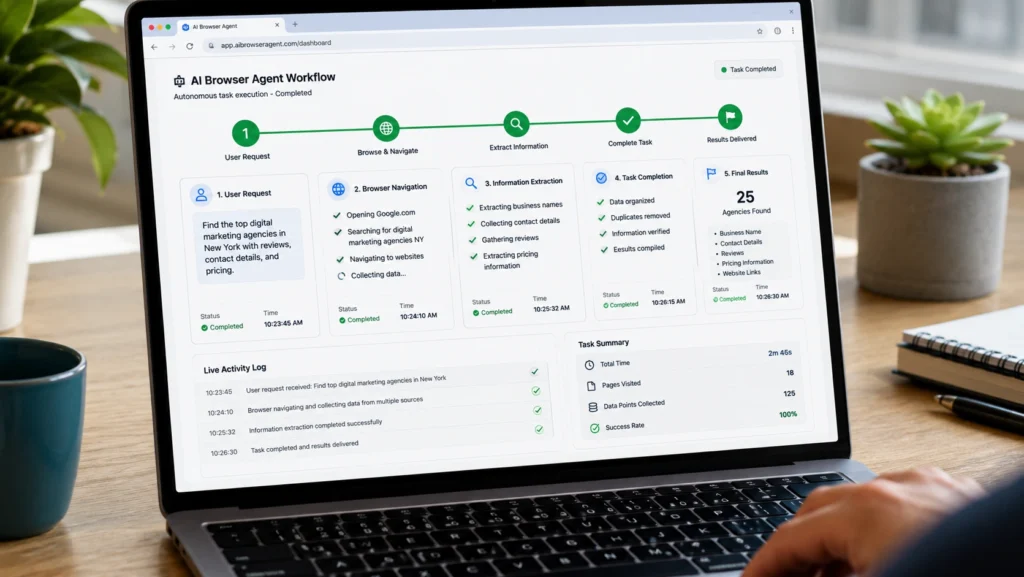
Decision Making
Unlike traditional automation scripts that follow fixed rules, AI browser agents can make decisions during tasks.
If one website changes its layout, the agent may still adapt and continue working.
This flexibility is what makes modern autonomous AI agents different from older automation systems.
Benefits of Using AI Browser Agents
Save Significant Time
The most obvious benefit is time savings.
Tasks that normally take an hour can sometimes be completed in minutes.
Reduce Repetitive Work
Many online activities involve repeated actions.
Examples include:
- Data collection
- Lead research
- Market analysis
- Form submissions
- Product comparisons
AI agents can handle much of this repetitive work automatically.
Improve Research Efficiency
Researchers often spend considerable time gathering information from different sources.
AI browser agents can organize and summarize information much faster.
Increase Productivity
Instead of switching between dozens of tabs, users can focus on higher value work while the AI handles routine tasks.
Best AI Browser Agents in 2026
OpenAI Operator
OpenAI introduced Operator as a browser based AI agent capable of completing tasks across websites.
Popular use cases include:
- Online research
- Scheduling activities
- Website interaction
- Information gathering
Operator represents one of the most visible examples of browser automation AI becoming mainstream.
Browser Use
Browser Use has gained attention among developers building autonomous web agents.
It helps AI models interact with websites more effectively and perform browser based actions.
Many experimental AI agent projects now rely on Browser Use technology.
Manus
Manus became widely discussed because of its ability to execute complex tasks with minimal supervision.
Users often employ it for:
- Research
- Data gathering
- Workflow automation
- Business intelligence
Its popularity highlights the growing demand for autonomous AI agents that can complete multi step tasks.
AgentOps
AgentOps focuses on helping organizations manage and monitor AI agents operating across workflows and web environments.
Businesses often use it when deploying larger automation systems.
Hyperbrowser
Hyperbrowser provides infrastructure designed specifically for browser based AI workflows.
It supports scalable browser automation and web task execution.
Real World Use Cases
Student Research
A university student researching renewable energy can ask an AI browser agent to:
- Gather articles
- Compare findings
- Create summaries
- Organize references
Instead of spending hours searching manually, the student receives a structured research package.
Competitor Analysis
A small business owner may use browser agents to:
- Visit competitor websites
- Compare pricing
- Track product updates
- Create comparison reports
This helps support informed business decisions.

Lead Generation
Sales professionals often spend large amounts of time identifying potential clients.
AI browser agents can automate parts of the research process while organizing collected information.
Content Creation Research
Content creators frequently need information from multiple sources.
AI agents can gather facts, trends, statistics, and references faster than manual browsing alone.
Common Mistakes When Using AI Browser Agents
Giving Vague Instructions
Poor instructions usually produce poor results.
Instead of saying:
“Research AI tools.”
A better prompt would be:
“Find ten AI productivity tools for students, compare pricing, and summarize key features.”
Trusting Results Without Verification
AI can accelerate research, but users should still verify important information.
Fact checking remains essential.
Automating Everything
Not every task should be automated.
Critical decisions still require human judgment and oversight.
Ignoring Privacy Considerations
Users should be cautious when allowing AI agents access to sensitive information, login credentials, or confidential data.

Best Practices for AI Web Automation
Start With Simple Tasks
Begin with repetitive workflows that consume time but require minimal decision making.
Examples include:
- Research collection
- Data organization
- Website monitoring
Review Outputs Regularly
Even advanced AI systems can make mistakes.
Regular reviews improve accuracy and reliability.
Use Clear Instructions
Specific goals produce better outcomes.
The more context you provide, the more useful the results tend to be.

Combine AI With Human Expertise
The most effective workflows usually involve collaboration between human judgment and AI execution.
This balance often delivers the strongest results.
Frequently Asked Questions
What are AI browser agents?
AI browser agents are intelligent systems that can interact with websites, navigate pages, collect information, fill forms, and perform online tasks automatically.
How do AI browser agents work?
They combine artificial intelligence, browser automation, and decision making capabilities to complete web based tasks through a browser environment.
What are the best AI browser agents in 2026?
Some popular options include OpenAI Operator, Browser Use, Manus, AgentOps, and Hyperbrowser.
Are AI browser agents useful for students?
Yes. Students can use them for research, information gathering, note organization, and productivity related tasks.
Can AI browser agents replace human work?
They can automate repetitive tasks, but human oversight remains important for decision making, creativity, and quality control.
Conclusion
AI browser agents are changing how people interact with the internet. Rather than manually navigating websites and repeating the same actions every day, users can now delegate many routine tasks to intelligent systems capable of working through a browser.
For students, researchers, freelancers, and businesses, the potential benefits are clear. Faster research, improved productivity, reduced repetitive work, and more efficient workflows are becoming increasingly accessible.
As these tools continue evolving, understanding how to use them effectively will become an important skill. The goal is not to replace human expertise but to remove unnecessary friction so people can focus on work that requires creativity, critical thinking, and strategic decision making.

Interested in discovering more practical AI tools, automation workflows, and productivity strategies? Explore additional guides on AI With Sahil to stay updated with the latest developments in artificial intelligence and smart automation.