
AI Tools Students Are Secretly Using in 2026
The Most Useful AI Tools Helping Students Study Smarter, Save Time, and Improve Productivity
Introduction
Ask a group of students how they manage assignments, research projects, exam preparation, and note taking in 2026, and you will quickly notice a pattern. Many of them are quietly using AI to make studying easier.
The truth is that AI tools for students have become part of everyday academic life. They help simplify research, organize notes, explain difficult concepts, improve writing, and save valuable time. What once took hours can often be completed in a fraction of the time when the right tools are used correctly.
However, the smartest students are not using AI to avoid learning. They are using it to learn more efficiently. In this guide, we will explore the most useful AI tools helping students stay productive, improve understanding, and manage academic workloads without feeling overwhelmed.
Why Students Are Turning to AI in 2026?
College and university workloads continue to increase every year. Students often balance classes, projects, part time jobs, internships, and personal responsibilities at the same time.
Many struggle with:
- Information overload
- Research challenges
- Time management
- Assignment deadlines
- Note organization

This is where artificial intelligence becomes useful.
Instead of spending hours searching through multiple websites, students can use AI to summarize information, organize ideas, and understand difficult topics more quickly.
A business student preparing for exams may use AI to create revision notes. An engineering student may use it to simplify technical concepts. A marketing student may use AI to brainstorm project ideas and organize research.
The goal is not replacing effort. The goal is making effort more effective.
How AI Tools Help Students Learn Faster?
One reason AI adoption continues to grow among students is because it supports active learning.
Rather than simply providing answers, many AI systems can:
- Explain concepts in simpler language
- Create practice questions
- Generate study plans
- Summarize lengthy material
- Organize notes
- Assist with research

For example, a student struggling with economics can ask an AI assistant to explain a concept using real life examples. The same concept can be explained again at a beginner, intermediate, or advanced level depending on the student’s understanding.
This personalized learning experience is one reason many students believe AI tools that help students learn faster will become standard educational resources in the coming years.
Many students also use productivity focused AI tools to organize notes, manage assignments, and improve time management. If you’re looking for more options, check out our guide on Best AI Productivity Tools That Save Time in 2026.
Best AI Tools for Students in 2026
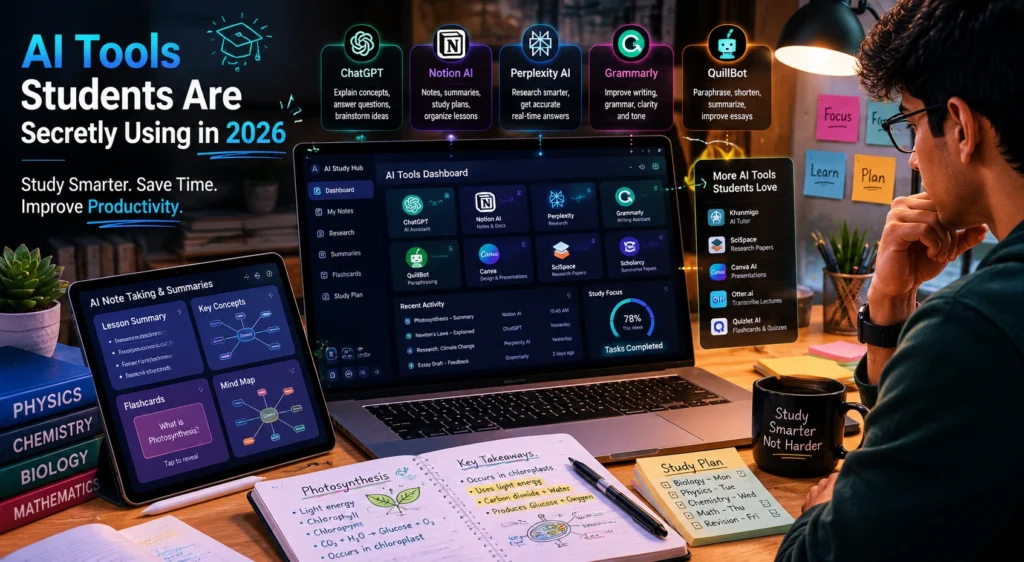
ChatGPT
OpenAI created ChatGPT, which has become one of the most widely used educational tools among students.
Students use ChatGPT for:
- Understanding difficult topics
- Creating study guides
- Brainstorming assignment ideas
- Practicing interview questions
- Learning new skills
For example, a psychology student can ask for simplified explanations of complex theories and then request real world examples for better understanding.
The most effective students use ChatGPT as a learning assistant rather than a shortcut for assignments.
Perplexity AI
Perplexity AI has become a favorite research tool for students.
Unlike traditional search engines, it provides direct answers while citing sources.
Students use it for:
- Academic research
- Topic exploration
- Literature reviews
- Quick fact verification
- Research summaries
One major advantage is transparency. Students can verify information directly from cited sources rather than relying entirely on generated responses.
Notion AI
Notion Labs offers one of the most practical organizational systems available for students.
Useful features include:
- Note organization
- Assignment tracking
- Study planning
- Knowledge management
- AI summaries
Students often struggle more with organization than learning itself. A well structured workspace can significantly reduce stress during busy semesters.
Grammarly
Grammarly remains one of the most useful writing assistants for academic work.
Students use Grammarly to:
- Improve grammar
- Strengthen clarity
- Enhance readability
- Check tone
- Edit essays
A well written assignment communicates ideas more effectively. Grammarly helps students focus on content without worrying excessively about writing mistakes.
Otter AI
Otter.ai helps students capture lectures and discussions automatically.
Common uses include:
- Lecture transcription
- Class summaries
- Group project meetings
- Study reviews
Students who struggle to take detailed notes while listening often find transcription tools extremely helpful.

Quizlet AI
Quizlet continues to be popular for exam preparation.
Students use it to:
- Create flashcards
- Practice quizzes
- Review concepts
- Test knowledge retention
Many learners find active recall techniques more effective than repeatedly reading notes.
Canva AI
Canva helps students create presentations, reports, and visual projects more efficiently.
Useful for:
- Presentation slides
- Infographics
- Academic posters
- Visual assignments
Students often underestimate the value of presentation quality. Clear visuals can improve communication and engagement significantly.
AI Tools for Research and Academic Projects
When it comes to research, students often spend excessive time collecting information and organizing sources.
Some of the most useful ai tools for research include:
- Perplexity AI
- ChatGPT
- Notion AI
- Google NotebookLM
These tools help students:
- Understand research papers
- Summarize long articles
- Compare viewpoints
- Organize references
- Generate study notes
Mini Case Study
Imagine a student preparing a research paper on renewable energy.
Without AI:
- Multiple hours searching sources
- Manual note organization
- Slow information comparison
With AI support:
- Faster topic exploration
- Organized notes
- Simplified explanations
- Better research structure
The student still performs the analysis but saves significant time during preparation.
Common Mistakes Students Make With AI
Copying AI Content Directly
One of the biggest mistakes is submitting AI generated work without understanding it.
This can hurt learning and create academic integrity issues.
Trusting Every Answer
AI can occasionally make mistakes.
Students should verify facts, especially when working on research projects and academic submissions.
Ignoring Critical Thinking
The purpose of education is understanding, not simply producing answers.
Students who use AI as a thinking partner often gain more value than those who use it only for quick solutions.

Best Practices for Using AI Responsibly
Use AI to Understand Concepts
Ask AI to explain topics, create examples, and simplify difficult ideas.
Learning should remain the priority.
Verify Important Information
Always cross check:
- Statistics
- Research findings
- Academic references
- Technical information
Reliable sources remain important.
Build Better Study Systems
The most successful students combine:
- AI assistance
- Personal notes
- Practice questions
- Revision schedules
AI works best as part of a larger study process.
Frequently Asked Questions
What are the best AI tools for students in 2026?
Some of the best AI tools for students include ChatGPT, Perplexity AI, Notion AI, Grammarly, Otter AI, Quizlet AI, and Canva AI.
Are AI tools for students free?
Many AI tools offer free plans with useful features. Some advanced capabilities require paid subscriptions.
Which AI tools help students learn faster?
ChatGPT, Quizlet AI, and Perplexity AI are among the most useful AI tools that help students learn faster through explanations, quizzes, and research support.
Can AI help with academic research?
Yes. AI tools for research can help students summarize information, organize sources, understand papers, and gather insights more efficiently.
Is it okay to use AI for studying?
Yes, when used responsibly. AI can support learning, organization, and productivity, but students should still understand the material themselves.
Conclusion
The growing popularity of AI tools for students is not surprising. Students face increasing workloads, tighter deadlines, and larger amounts of information than ever before.
The most effective learners are not using AI to avoid studying. They are using it to study smarter. Whether it is organizing notes, researching topics, improving writing, or preparing for exams, AI can reduce unnecessary effort and create more time for meaningful learning.
When combined with critical thinking and responsible use, these tools can become valuable academic companions rather than simple shortcuts.

Interested in discovering more practical AI tools, productivity strategies, and learning resources?
Explore more guides on AI With Sahil and stay updated with the latest AI tools that can help you learn, create, and work more efficiently.