

Best AI Automation Tools in 2026
The Best AI Tools for Automating Workflows, Productivity, Content Creation, and Online Business Tasks
Introduction
Managing content, emails, client work, social media, research, and daily tasks can quickly become overwhelming. That is one reason why the best AI automation tools are becoming essential in 2026. Many creators, influencers, freelancers, and online business owners are now using AI to handle repetitive work faster while focusing more on creativity and growth.
The biggest advantage of automation is not replacing human work. It is removing unnecessary manual tasks that waste time every day. Whether someone wants to automate content scheduling, email responses, workflow organization, or research processes, modern AI automation software makes those tasks much easier to manage.
At the same time, not every automation tool is worth using. Some are complicated, expensive, or create messy workflows. This guide explains the best AI workflow automation tools available in 2026, how they work in real situations, and how to use them effectively without depending on automation too heavily.
Table of Contents
- What Are AI Automation Tools?
- Why AI Automation Is Growing Fast in 2026?
- Best AI Automation Tools in 2026
- How Creators Use AI Automation Software?
- Best AI Workflow Automation Tools for Online Businesses
- Common Mistakes People Make With Automation
- Best Practices for Using AI Automation Efficiently
- FAQs
- Conclusion
What Are AI Automation Tools?
AI automation tools are software platforms that use artificial intelligence to complete repetitive digital tasks automatically. These tools reduce manual work by connecting apps, organizing workflows, generating content, summarizing information, and handling routine operations.
For example, instead of manually posting content across different social media platforms every day, an automation tool can schedule and publish posts automatically.
A creator may use automation for:
- Content scheduling
- Email replies
- Research summaries
- Task management
- Lead organization
- Workflow tracking
Meanwhile, a freelancer may automate invoices, client updates, and project reminders to save time during busy weeks.

The goal is simple. Spend less time on repetitive tasks and more time on meaningful work.
Why AI Automation Is Growing Fast in 2026?
he amount of digital work people manage today is much higher than it was a few years ago. Creators are expected to publish content regularly across multiple platforms. Businesses reply to customers constantly. Freelancers handle communication, research, editing, and organization at the same time.
This creates mental overload.
That is where AI automation software becomes useful. Instead of switching between five different apps repeatedly, users can create connected workflows that run automatically in the background.

For example, a YouTube creator can build an automation system where:
- Video uploads trigger social media posts
- AI generates captions automatically
- Analytics reports are organized into dashboards
- Emails are sent to subscribers automatically
These systems save hours every week.
More importantly, they reduce decision fatigue. Many people underestimate how exhausting repetitive digital tasks can become over time.
Best AI Automation Tools in 2026
Zapier AI
Zapier remains one of the most widely used AI workflow automation tools available today.
Zapier connects thousands of apps together and automates actions between them.
People commonly use Zapier for:
- Email automation
- Lead management
- Content publishing
- Social media workflows
- Customer support tasks
For example, a creator selling digital products can automatically:
- Collect customer emails
- Send welcome messages
- Add leads into spreadsheets
- Deliver products instantly
This reduces manual admin work significantly.
One important tip is keeping workflows simple at first. Many beginners create overly complicated systems that become difficult to manage later.

Make
Make has become popular among creators and online businesses because of its visual workflow builder.
Unlike traditional automation tools, Make allows users to design advanced systems visually.
It works especially well for:
- Multi step automation
- Content workflows
- Data organization
- Ecommerce operations
- Marketing automation
A content creator, for example, can automatically collect blog ideas from forms, organize them into a database, and send reminders for publishing schedules.
The flexibility is impressive, although beginners may need time to understand advanced workflows properly.

Notion AI
Notion Labs combines organization with AI powered workflow assistance.
Many influencers and creators use Notion AI to manage:
- Content calendars
- Sponsorship tracking
- Research notes
- Script planning
- Team collaboration
One reason creators like Notion AI is because everything stays centralized.
Instead of managing scattered notes across different apps, users can organize workflows in one workspace while using AI to summarize, brainstorm, and structure information quickly.

ChatGPT
OpenAI continues to be one of the most flexible AI tools for work and automation support.
Although many people think of ChatGPT mainly as a chatbot, creators now use it for:
- Writing outlines
- Generating content ideas
- Research assistance
- Email drafting
- Workflow planning
- Customer response templates
For example, a freelancer managing multiple clients can create reusable prompts for proposals, onboarding messages, and content planning.
This saves time without removing personal communication entirely.
Still, users should review outputs carefully instead of copying everything directly.

ClickUp AI
ClickUp helps teams automate productivity and workflow management in one place.
Businesses commonly use ClickUp AI for:
- Project organization
- Team communication
- Task prioritization
- Workflow tracking
- Meeting summaries
One practical advantage is visibility. Team members can see progress clearly without constant meetings or repetitive updates.
Many small content teams now depend on AI productivity tools like ClickUp to handle publishing schedules more efficiently.

Grammarly
Grammarly is often associated with grammar correction, but many professionals also use it as part of automated writing workflows.
It helps with:
- Faster editing
- Tone consistency
- Email refinement
- Caption proofreading
- Business communication
For creators managing multiple platforms daily, quick writing improvements save more time than expected.
The key is using Grammarly as an assistant instead of allowing it to remove natural personality from writing.

Buffer AI
Buffer remains useful for creators who want simple content automation without overwhelming features.
Buffer helps automate:
- Social media scheduling
- Content planning
- Posting consistency
- Basic analytics tracking
Many beginner creators struggle with consistency because manual posting becomes exhausting over time.
Automation tools like Buffer help maintain regular publishing schedules more realistically

How Creators Use AI Automation Software?
Creators often handle multiple responsibilities alone:
- Content production
- Editing
- Research
- Brand deals
- Social media management
- Audience communication
Without systems, burnout becomes common.

Many successful creators now automate repetitive backend tasks while keeping creative work personal.
For example:
- AI schedules content automatically
- Emails are filtered and organized
- Research summaries save reading time
- Analytics reports update automatically
This allows creators to spend more energy on storytelling, strategy, and audience connection.
That balance matters.
Automation should support creativity, not replace it completely.
Best AI Workflow Automation Tools for Online Businesses
Online businesses use automation differently compared to creators.
They often focus on:
- Customer onboarding
- Payment tracking
- Lead collection
- Sales funnels
- Support systems
- CRM organization

For example, an online course business may automatically:
- Send purchase confirmations
- Deliver course access
- Trigger reminder emails
- Collect feedback
- Organize customer data
This improves customer experience while reducing manual workload.
Small businesses especially benefit because automation reduces the need for large support teams during early growth stages.
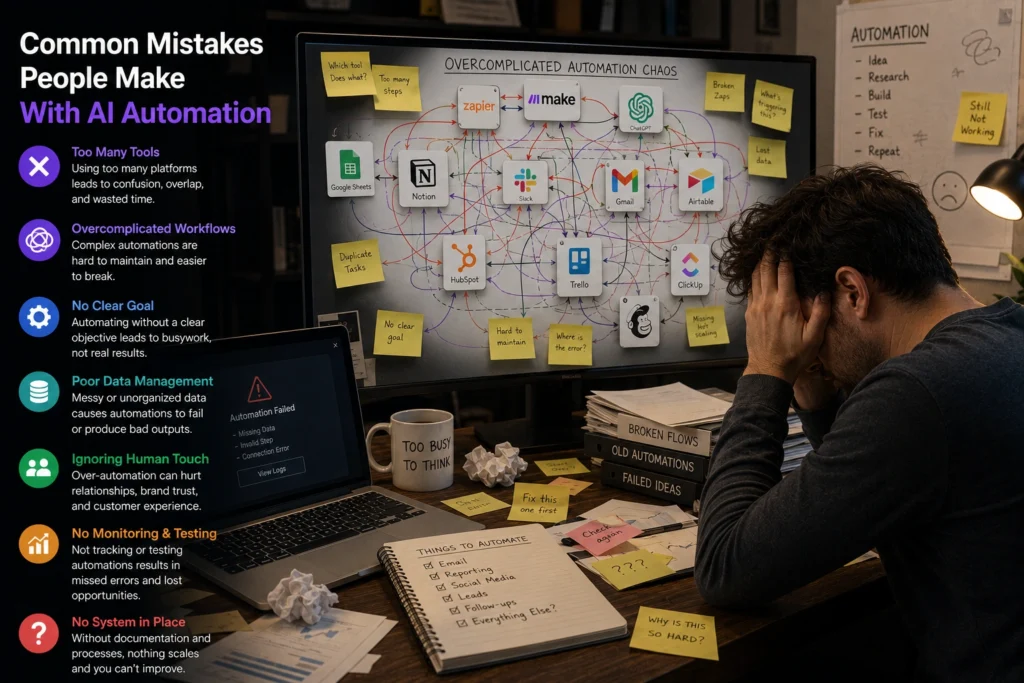
Common Mistakes People Make With Automation
Automating Everything Too Quickly
One major mistake is trying to automate every process immediately.
Some tasks still require personal attention, especially customer communication and creative decisions.
Automation works best when applied carefully.
Ignoring Workflow Simplicity
Complicated systems usually break more often.
Simple workflows are easier to maintain long term.
Depending Too Much on AI
AI generated responses and automation still require human oversight.
Users should review outputs regularly to avoid mistakes, poor communication, or incorrect information.
Best Practices for Using AI Automation Efficiently
Start With One Problem
Instead of automating everything at once, focus on one repetitive task first.
For example:
- Social media posting
- Email sorting
- Task reminders
- Research summaries
Small improvements create better long term systems.
Build Human Friendly Workflows
The best automation systems still feel natural to users and customers.
People can quickly notice robotic communication.
Maintaining authenticity matters, especially for creators and influencers.
Review Automated Systems Regularly
Automation should save time, not create hidden problems.
Review workflows regularly to ensure everything still works correctly as platforms and business needs change.
Frequently Asked Questions
What are the best AI automation tools in 2026?
Some of the best AI automation tools in 2026 include Zapier AI, Make, ChatGPT, Notion AI, ClickUp AI, Grammarly, and Buffer AI.
Are AI workflow automation tools useful for creators?
Yes. Creators use AI workflow automation tools for content scheduling, research organization, task management, and communication workflows.
Which AI automation software is best for beginners?
Zapier and Buffer are often easier for beginners because their interfaces are simple and beginner friendly.
Can AI automation tools save time daily?
Yes. Many users save several hours weekly by automating repetitive digital tasks such as posting content, organizing data, and managing workflows.
Are AI tools for work replacing human jobs?
AI tools mostly handle repetitive digital tasks. Human creativity, communication, strategy, and decision making still remain extremely important.
Conclusion
The best AI automation tools in 2026 are helping creators, freelancers, and online businesses work more efficiently without constantly feeling overwhelmed by repetitive tasks.
Good automation is not about removing human involvement completely. It is about reducing unnecessary manual work so people can focus on creativity, growth, and meaningful projects.
The most effective systems are usually simple, practical, and carefully organized. Instead of chasing every new automation trend, users benefit more from building workflows that genuinely solve everyday problems.
When used wisely, AI automation software becomes less about technology and more about creating smoother, less stressful work routines.

If you want more practical guides about AI workflow automation tools, creator productivity systems, and useful AI tools for work, explore more tutorials and resources on AI With Sahil